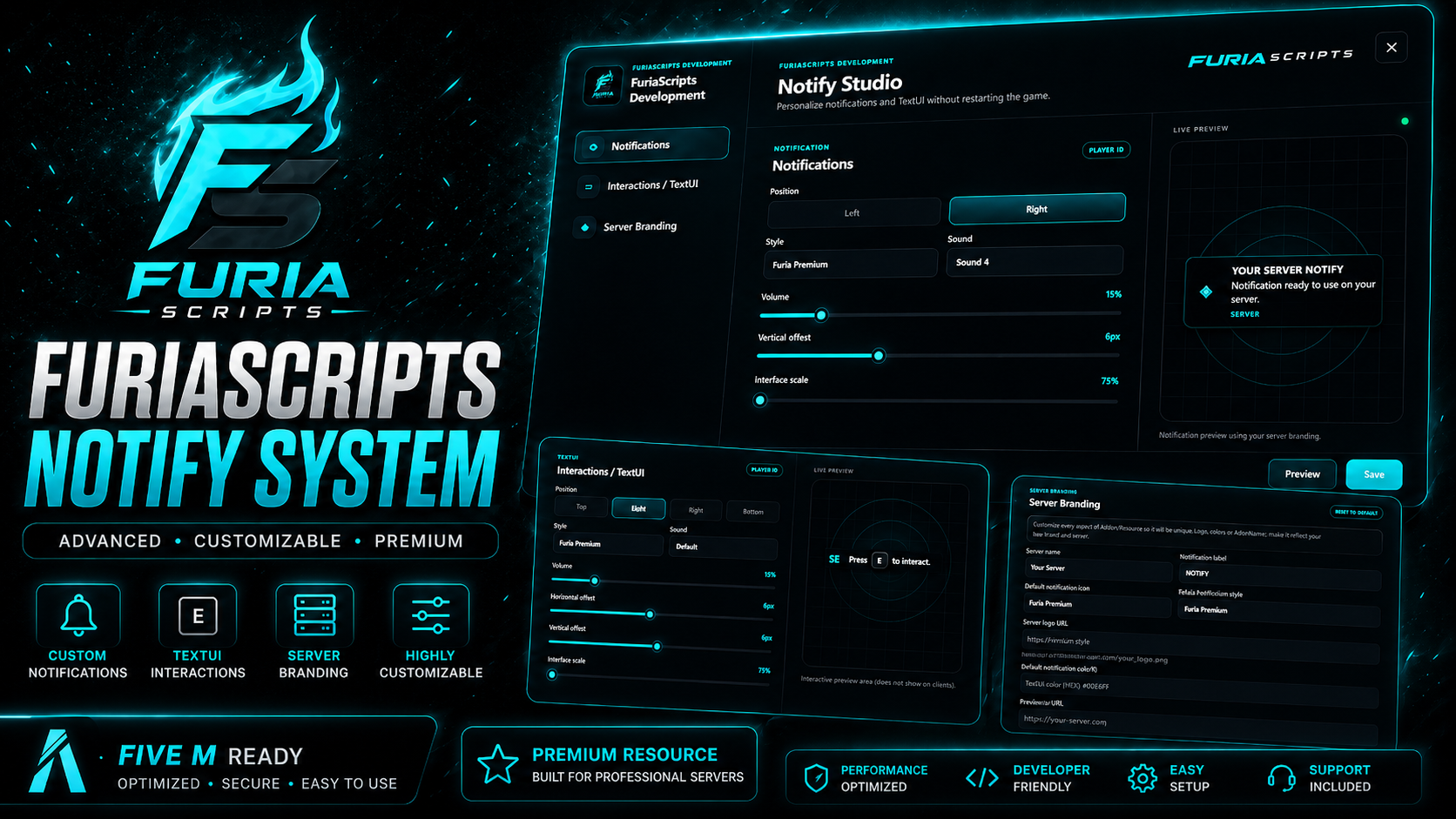
🔔 FuriaScripts Notify System FuriaScripts Notify System is an advanced notification, interaction and server-branding system built for professional FiveM roleplay servers using ESX Legacy . Replace basic server notifications and interaction prompts with a modern, fully customizable system designed around the FuriaScripts visual identity. Players can personalize their own notification and TextUI appearance, while server administrators can configure global branding, server logos, notification icons, interaction icons, default styles and other visual settings directly through the built-in Notify Studio . The resource features a premium dark interface with customizable server branding, multiple notification styles, animated TextUI interactions and a complete live-preview system. Key Features 🔔 Advanced customizable notification system 🎮 Modern TextUI / interaction system 🎨 Multiple premium notification styles 🎨 Matching TextUI interaction styles 🖥️ Built-in Notify Studio 👁️ Real-time notification preview 👁️ Real-time TextUI preview 🏢 Global server branding system 🖼️ Custom server logo through direct image URL 🔔 Custom default notification icon 🎮 Custom TextUI / interaction icon ✅ Custom success notification icon ❌ Custom error notification icon ℹ️ Custom information notification icon ⚠️ Custom warning notification icon 🎨 Configurable server colours 📍 Custom notification position 📍 Custom TextUI position ↔️ Horizontal interaction offset ↕️ Vertical notification and interaction offset 🔎 Adjustable interface scale 🔊 Configurable notification sounds 🔉 Adjustable notification volume 💾 Persistent player preferences 💾 Persistent global server branding 👮 Administrator-protected branding configuration 🌍 English and Polish language support ⚡ Optimized NUI interface 🖥️ FiveM CEF optimized rendering 🔄 ESX notification integration 🧩 Multiple export formats for easier script integration 🛡️ Server-side validation for global settings 🔐 CFX Asset Escrow ready ⚡ Designed for production FiveM servers Premium Notify Studio FuriaScripts Notify System includes a complete in-game configuration interface called Notify Studio . Players can configure their own interface without restarting FiveM. The notification editor allows players to customize: notification position; notification style; notification sound; sound volume; vertical offset; interface scale. Every change can be tested using the built-in Live Preview before saving. Once saved, player preferences remain available between sessions. Advanced Interactions / TextUI The resource also contains a complete interaction system designed to replace basic help notifications and outdated TextUI interfaces. Interactions can be displayed in multiple positions: Left Right Top Bottom Players can configure: interaction style; interaction position; horizontal offset; vertical offset; interface scale; sound; volume. TextUI uses the same premium style library as notifications , keeping the entire server interface visually consistent. Instead of having one design for notifications and another completely different design for interactions, server owners can create one unified visual identity across the entire server. Multiple Premium Styles Both notifications and TextUI interactions support multiple visual presets. Available styles include: Furia Premium Glass Minimal Compact Gradient Glow Neon Transparent Classic Light Each style changes the appearance while preserving the same clean interaction structure. Server administrators can choose the default notification style and default interaction style for their server. Players can then personalize their own interface where permitted. Server Branding System FuriaScripts Notify System is designed as a universal product that can be adapted to virtually any roleplay server. Authorized administrators receive access to the Server Branding section inside Notify Studio. Administrators can configure: server name; notification label; default notification style; default interaction style; server logo URL; default notification icon URL; TextUI icon URL; success icon URL; error icon URL; information icon URL; warning icon URL; primary server colour; secondary server colour. This means the resource does not need to visually remain branded around one specific RP server. Each customer can configure the system to match their own: server logo; colours; branding; notification identity; interaction identity. Custom Icons Through URL Server owners can use their own hosted images directly inside notifications and interactions. For example, administrators can configure: server logo; faction icon; interaction icon; success icon; warning icon; custom notification icon. Supported branding is designed around direct HTTP/HTTPS image URLs. This makes it possible to completely adapt FuriaScripts Notify System to the visual identity of an individual FiveM server without rebuilding the NUI. Live Preview System Before saving changes, users can preview exactly how the interface will look. The built-in preview supports both: Notifications and Interactions / TextUI The Server Branding section also provides a combined preview showing how the configured branding will appear across the server. This allows administrators to configure their interface without repeatedly restarting the resource or reconnecting to the server. Player Customization Each player can personalize their own interface. Player settings can include: preferred notification position; preferred notification style; notification scale; notification sound; notification volume; notification offset; preferred TextUI position; preferred TextUI style; TextUI scale; TextUI offsets; interaction sound. Player preferences are stored locally using FiveM resource storage. No additional SQL table is required for basic player UI preferences. Persistent Global Configuration Server branding settings are stored persistently and restored after resource/server restarts. Administrators do not need to configure the branding every time the resource starts. Global configuration can be synchronized with connected players so everyone receives the current server branding. ESX Legacy Integration FuriaScripts Notify System is designed primarily for ESX Legacy . It provides an easy API for new scripts while also supporting common ESX notification workflows. Example notification: exports['FURIASCRIPTS_NOTIFY_SYSTEM']:Notification({ title = 'SUCCESS', description = 'Your vehicle has been saved.', preset = 'success', time = 5000 }) Example TextUI: exports['FURIASCRIPTS_NOTIFY_SYSTEM']:ShowTextUI( 'Press ~INPUT_CONTEXT~ to interact.' ) The resource also contains additional export formats to make integration with existing resources easier. Notification Types The system supports common notification states such as: ✅ Success ❌ Error ⚠️ Warning ℹ️ Information 🔔 Standard notifications Each type can use its own server-configured icon and visual identity. Administrator Access Global branding controls are protected and are not available to normal players. Administrators can be configured using server permissions and supported ESX administrative groups. This prevents regular users from changing the visual identity of the entire server. Player-specific customization remains separate from global server configuration. Language System FuriaScripts Notify System includes: 🇬🇧 English 🇵🇱 Polish The active language can be configured through the resource configuration. Locale files remain accessible so server owners can modify text or create additional translations. Editable Configuration Configuration and language files remain accessible after purchase. Server owners can configure: language; administrative permissions; default branding; server name; notification label; colours; notification styles; TextUI styles; notification icons; interaction icons; sounds; default interface behaviour. Core protected logic can be delivered using CFX Asset Escrow , while intended configuration files remain editable. Performance The resource was designed with FiveM NUI performance in mind. The interface avoids unnecessary permanent rendering and uses event-driven communication wherever possible. Special attention has been given to: FiveM CEF rendering; sharp notification text; lightweight UI animations; efficient TextUI updates; preventing unnecessary notification duplication; avoiding permanently active interaction prompts. Installation The resource is delivered as a single resource: FURIASCRIPTS_NOTIFY_SYSTEM Example server.cfg : ensure FURIASCRIPTS_NOTIFY_SYSTEM For ESX servers, load the required framework resources according to your server configuration. Full installation instructions are included with the resource.
ESX
ONE-TIME PRICE7.99 EURSecure checkout powered by Tebex
✓One-time payment✓Delivery through your Cfx.re account✓Secure Tebex checkout
NEW
FULL PRODUCT DETAILS
Requirements
FiveM • ESX Legacy No additional SQL database is required for the standard notification, branding and player-preference system. CFX Asset Escrow The resource is prepared for FiveM CFX Asset Escrow distribution. Editable configuration, locale and documentation files can remain accessible to customers while protected core resource logic is delivered through CFX Asset Escrow.
Delivery
Delivered through your CFX.re account using FiveM Asset Escrow after purchase. Store 🛒 FuriaScripts Development https://furiascripts-shop.vercel.app/ Support 💬 FuriaScripts Development Discord https://discord.com/invite/cVeGDTd8hD Notifications. Interactions. Your Server Branding. One Complete System. Built by FuriaScripts Development.
Refund Policy
Due to the digital nature of this product, all sales are final. Refunds are not accepted once the product has been purchased and delivered to the customer’s CFX.re account, except where required by applicable law or Tebex policies. Please review the product description, requirements and compatibility before purchasing. If you have any questions before purchase, contact us through the FuriaScripts Development Discord .
VERIFIED PURCHASE REVIEWS
Reviews from real customers
A review can only be submitted after a Tebex-confirmed purchase.